Interactive Classroom Review Game
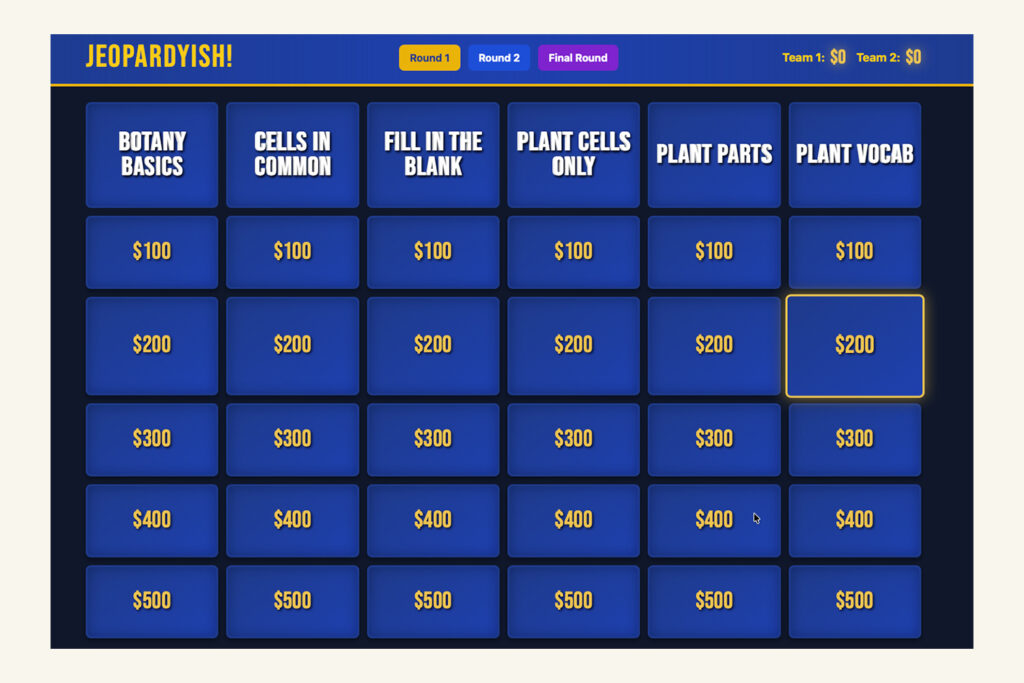
Jeopardyish is an interactive, two-team study review game for classrooms, homeschool co-ops, tutoring sessions, and study groups. Build a board from the lessons you already taught, display it on a smartboard or shared screen, and let students compete to recall what they know.
No installation. No plugins. No student accounts. No ads. No student data collection.


More than a review game
Review works best when students have to retrieve knowledge instead of simply rereading notes or recognizing an answer on a worksheet. Every card in Jeopardyish asks students to bring an answer to mind before the answer is revealed.
Both teams hear every question, so the entire group gets repeated practice—not only the team whose turn it is. Wrong answers cost points, giving students a reason to pause, think, and commit to an answer instead of guessing.
Built for the way you teach
Classroom review
Use Jeopardyish before a unit test, as a Monday warm-up, after a lesson sequence, or during the last 15 minutes of class. Two teams keep the room involved while you control the pace.
Homeschools and co-ops
Play with as few as two learners or use it with a larger co-op group. Because you create the questions, you decide the subject, grade level, reading level, and difficulty. Build separate versions of the same topic for siblings or different learning groups.
Tutoring and study groups
Use a tutor-created board to review targeted skills, or let students build boards for one another. Deciding what matters enough to ask about is a useful study activity in itself.
Any subject or standard
Use Jeopardyish for vocabulary, math facts, science concepts, historical events, reading comprehension, language learning, test review, career and technical education, or any content you teach. Your board reflects your curriculum—not someone else’s generic question bank.
Build a board your way
Create a complete game with two rounds, six categories per round, five point values in each category, and a Final Round with team wagers. Choose the setup method that fits your planning time.
Enter questions one at a time
Choose a round, category, and point value, then type in a question and answer. This is ideal for a quick warm-up, a smaller review game, or adding questions to a board you already started.
Upload a completed CSV template
Download the template, write your questions in a spreadsheet application, and upload the finished board in seconds. This is ideal for a full unit review or for educators who prefer to plan in a spreadsheet.
Use AI with your own lesson materials
Jeopardyish includes a copy-and-use prompt designed for the CSV template. Use it with your own worksheets, notes, slides, or lesson materials to draft a full board based on what you actually taught. Review and edit every question before uploading so the wording, accuracy, and difficulty fit your students.
Play anywhere you teach
Open Jeopardyish in a modern browser, project it on a smartboard, interactive whiteboard, classroom display, TV, laptop, or desktop screen, and begin. No installation or plugin is required.
For the best experience, use a current browser and a stable internet connection. Touch interaction depends on the interactive display and browser you use.
What your license includes
- Two full review rounds with six categories and five point values per category
- A Final Round with team wagers
- A dashboard for creating and managing custom boards
- Manual question entry
- CSV board upload
- A downloadable CSV template
- A copy-and-use AI prompt for adapting your own lesson materials into board content
- A free question set with every purchase
- Step-by-step setup directions inside the game
- Browser-based access from supported devices where you sign in
Built with student privacy in mind
Jeopardyish is designed for teacher-led and homeschool-led review. Students do not need to create accounts, provide names, or enter email addresses to play.
- No student accounts
- No student names required
- No student email addresses required
- No student data collected through gameplay
- No advertising
- No third-party plugins required for the game itself
Designed for accessible teacher-led play
Jeopardyish is designed and tested against applicable WCAG 2.1 AA guidance for color contrast, keyboard access, reflow, and non-flashing content.
- High-contrast display: Text and background combinations meet or exceed WCAG AA contrast thresholds. Category labels reach 8.7:1, point values 5.3:1, and team scores 4.6:1, compared with the 4.5:1 AA requirement for normal text.
- Large, display-friendly text: Category names and values scale with screen size and reach approximately 39 pixels on a standard classroom display. Longer category names wrap rather than becoming too small to read.
- Keyboard operation: Cards and controls respond to Tab and Enter; no mouse is required.
- 200% browser zoom support: The layout reflows at 200% zoom without horizontal scrolling or clipped content.
- Teacher-paced activity: There are no countdown timers or automatically advancing screens, giving students the processing time they need.
- No flashing content: The game contains no flashing or strobing visual effects.
- Text-based questions: Questions appear as text and do not depend on audio to be understood.
- Teacher-controlled language: You choose the question wording, reading level, vocabulary, and language complexity. Create different versions of a board for different groups when needed.
Start playing in minutes
- Purchase a Jeopardyish license through Gumroad.
- Receive your license key on the purchase receipt and by email.
- Sign in to the Jeopardyish dashboard.
- Enter your license key.
- Create a board by entering questions, uploading the CSV template, or adapting your lesson materials with the included AI prompt.
- Open the board on a shared screen and start playing.
Keep your license key available for access from supported devices where you sign in.
Jeopardyish is an independent product and is not affiliated with, endorsed by, or sponsored by the television program Jeopardy! or its trademark owners.